Community · only at Wolf Territories
Wolf Chat
Your groups, like Discord – inside the grid.
Every group you choose becomes a server with its own text channels, voice rooms, pictures, GIFs and pinned messages – and a group owner can link a channel to Discord, so friends outside the grid can talk with you too.
Wolf Chat is in WolfViewer Welcome Home – download it below – and in WolfStorm, our web viewer.
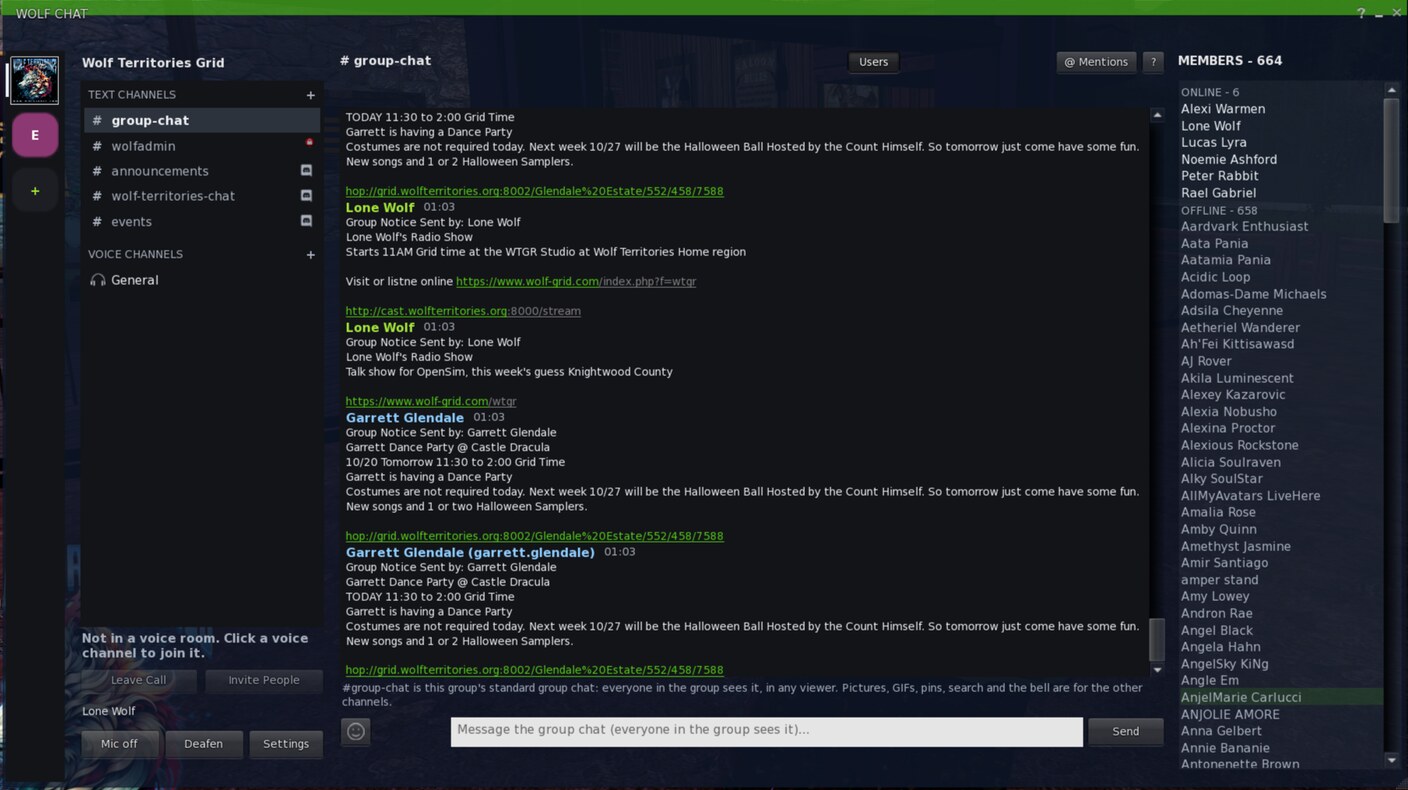
What you get
- Your groups down the left – press + to add only the ones you chat in
- Text channels and voice rooms for each group
- #group-chat in every group is the normal group chat, so everyone on any viewer sees it
- Pictures from your inventory, GIFs, emoji and pinned messages
- Who is online and offline in the group, on the right
- A bell per channel: every message, only @mentions, or nothing
Open it
In WolfViewer choose Wolf World > Wolf Chat…, or press the Group Chat button on any of your groups. The first time, press Add a group and pick the groups you want. Removing a group from Wolf Chat does not take you out of the group.
Link a channel to Discord
You need to be an owner of the Wolf group, and have Manage Webhooks in the Discord channel (Discord server admins have it).
-
Add Wolf-Bot to your Discord server
Once per server: open the link below, pick your server and press Authorise.
Add Wolf-Bot to Discord -
Get a link code in-world
In Wolf Chat pick your group and the text channel, right-click the channel and choose Bridge to Discord…. You get a code like WOLF-ABCDE-FGHJK. It works once and lasts 10 minutes.
-
Link it on Discord
In the Discord channel you want, type:
/wolflink code:WOLF-ABCDE-FGHJK
-
Done – talk both ways
Messages from the grid show on Discord as Name (Wolf); messages from Discord show in Wolf Chat as Name (Discord). Pictures you post in-world appear on Discord.
Unlink
Type /wolfunlink in the Discord channel, or right-click the channel in Wolf Chat and choose Unlink from Discord.
Good to know
- A linked channel shows a Discord badge in Wolf Chat: its messages can be read outside the grid.
- One Wolf channel links to one Discord channel.
- Nobody can ping @everyone or roles through the link.
- Pictures posted on Discord show in-world as “[picture on Discord]” for now, and grid links posted on Discord arrive as plain text.
- Voice rooms are not linked to Discord yet.
- Code expired, or the link shows as broken? Get a new code and link again.
Stuck? Contact us.